Prompt Guide
Helps users craft effective AI prompts for accurate, relevant, and high-quality responses. It includes best practices, examples, and techniques for various use cases like content creation, coding, and problem-solving.
Written By HeyBoss
Last updated About 1 year ago
Things you can prompt
Type your initial idea
"Create a Gen-Z AI app for cute AI girlfriend named Terry to chat with using OpenAI. Ability to send flowers to her"
Add a new feature
Add a welcome screen with firework effect!
Request bug fix
The "start" button doesn't work. Please add a sign up form when users click this button
Add your photos/videos
[Attach your own photos using "Upload"] Use photos attached as the header slideshow for my portfolio.
Must Know Tips
Give context
Provide background information to help AI better understand your needs: "Create a cute, cartoony app for kids' stories. Must have big buttons with vibrant colors"
Add constraints
Constraints help AI stay focused and avoid unnecessary complexity. "Create a simple to-do app with max 5 tasks visible at a time. Include the ability to add and delete tasks.
Upload a reference photos
You can upload an image using "Upload" and ask AI to copy the design. "
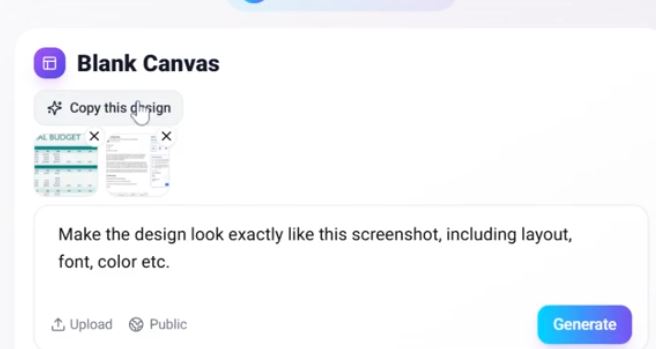
Create and implement a UI that looks as similar as possible to the image attached. "
If AI keeps getting it wrong
restore the last working version using the 'Restore' button.
simplify feature requests—ask one at a time instead of multiple at once.
tell AI "consider alternative approaches (e.g., different methods or tools)"
If AI fixes your thing but mess up other things: Restore first and then tell AI "Only fix the sign up form, avoid making other changes." If AI struggles, move to another feature first and return later. You can export code to edit if needed.
Things NOT to do
Don’t include many instruction in one prompt
Don't ask AI to do too many things each prompt.
BAD: "Add login, a sign up form, and contact us form to the main page. "
GOOD: "Add login" "add sign up form" "add contact us form"
Avoid ambiguity
Avoid vague terms and be as specific as possible about what you need.
BAD: "Make this app better"
GOOD: "Create a user registration form with fields for username, email, and password and include a submit button."